Overview
The Enterprise Agreement (EA) Subscription Vending solution enhances the process of deploying development subscriptions to Continis by introducing automated Azure subscription deployment either through a user-friendly web interface (UI) or via the creation of a configuration file and pull request.
This guide provides an overview of the solution as deployed, including the individual components and any requirements.
Separate low-level guides detail each of the solution's respective components
Azure Tenants
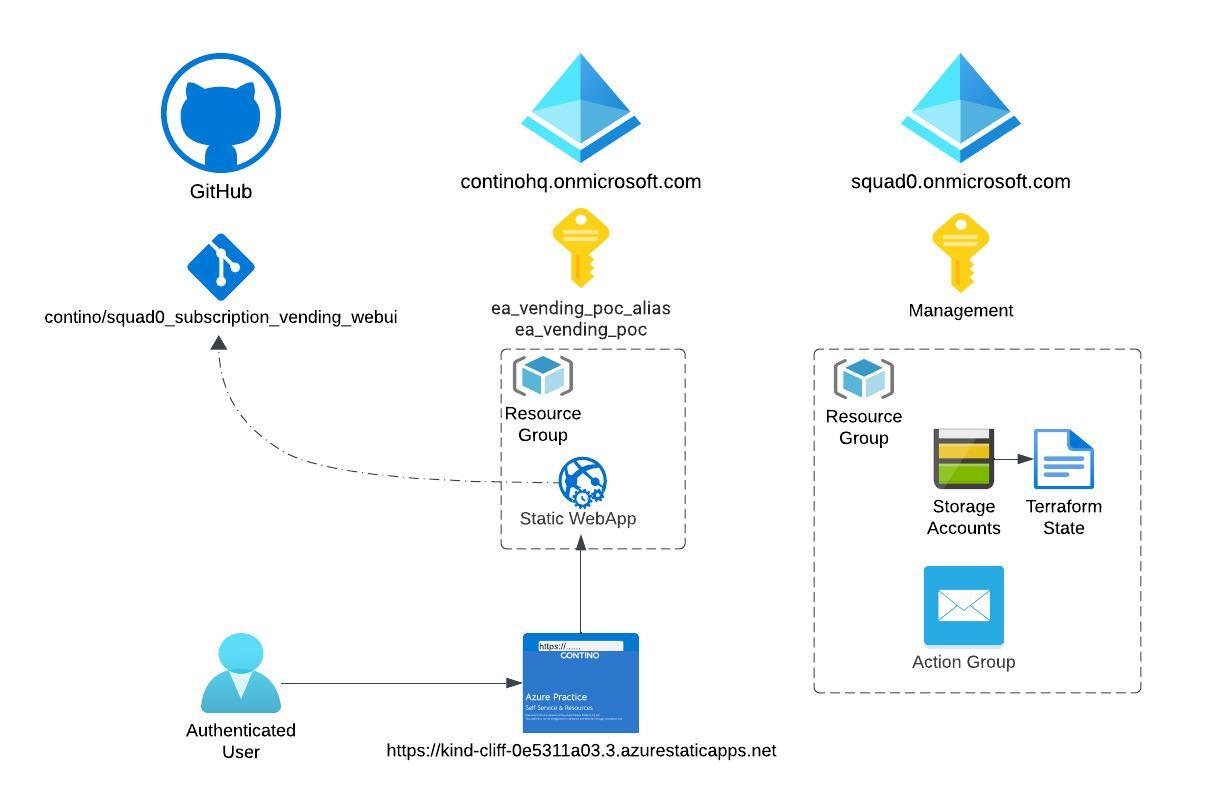
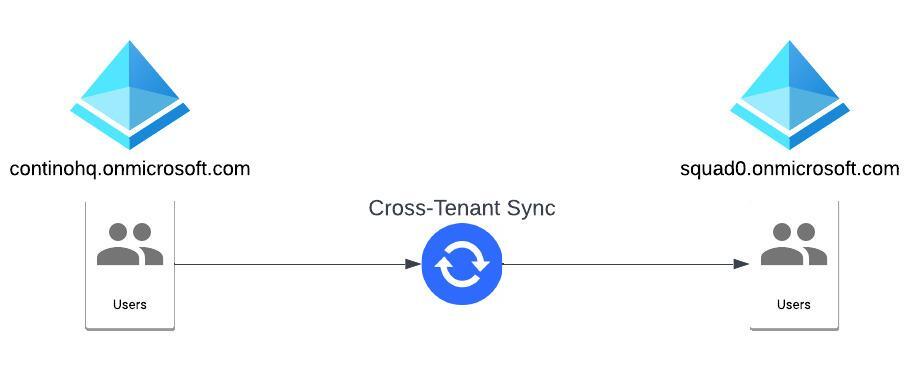
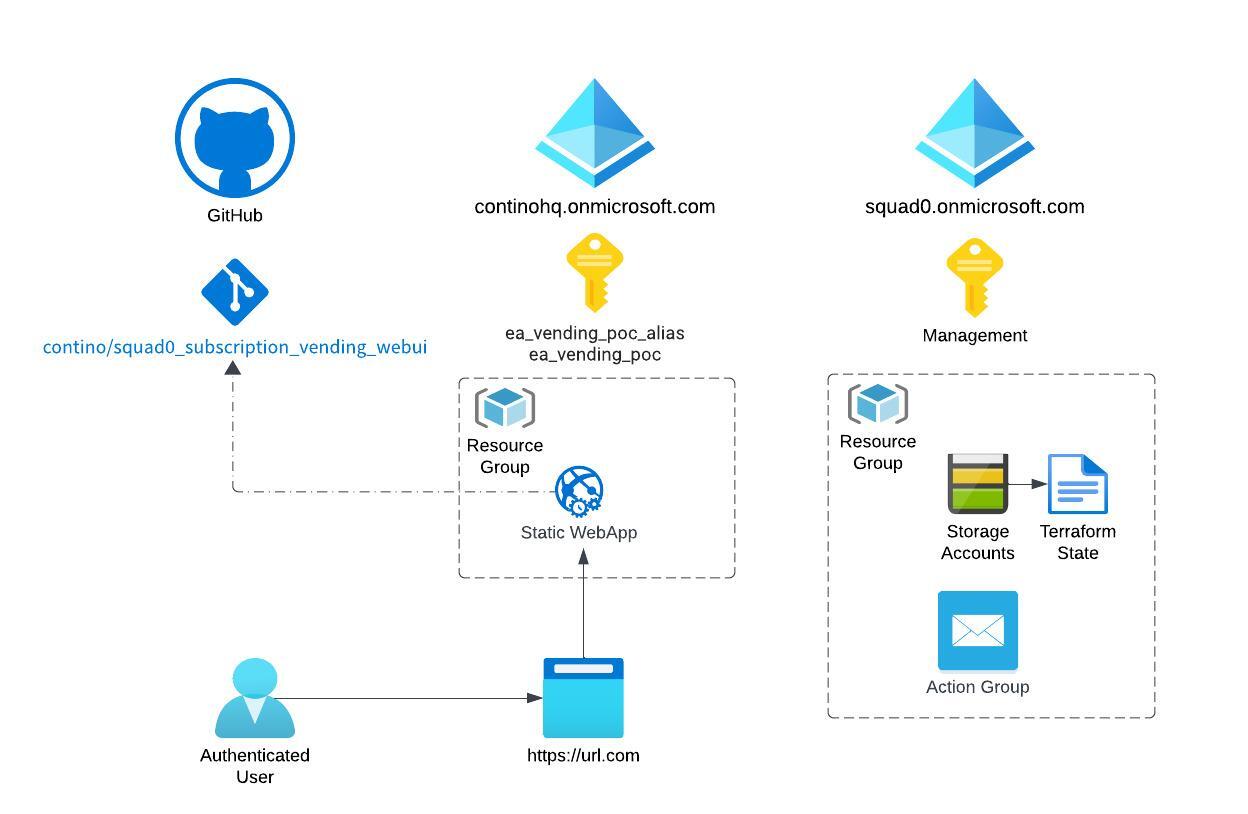
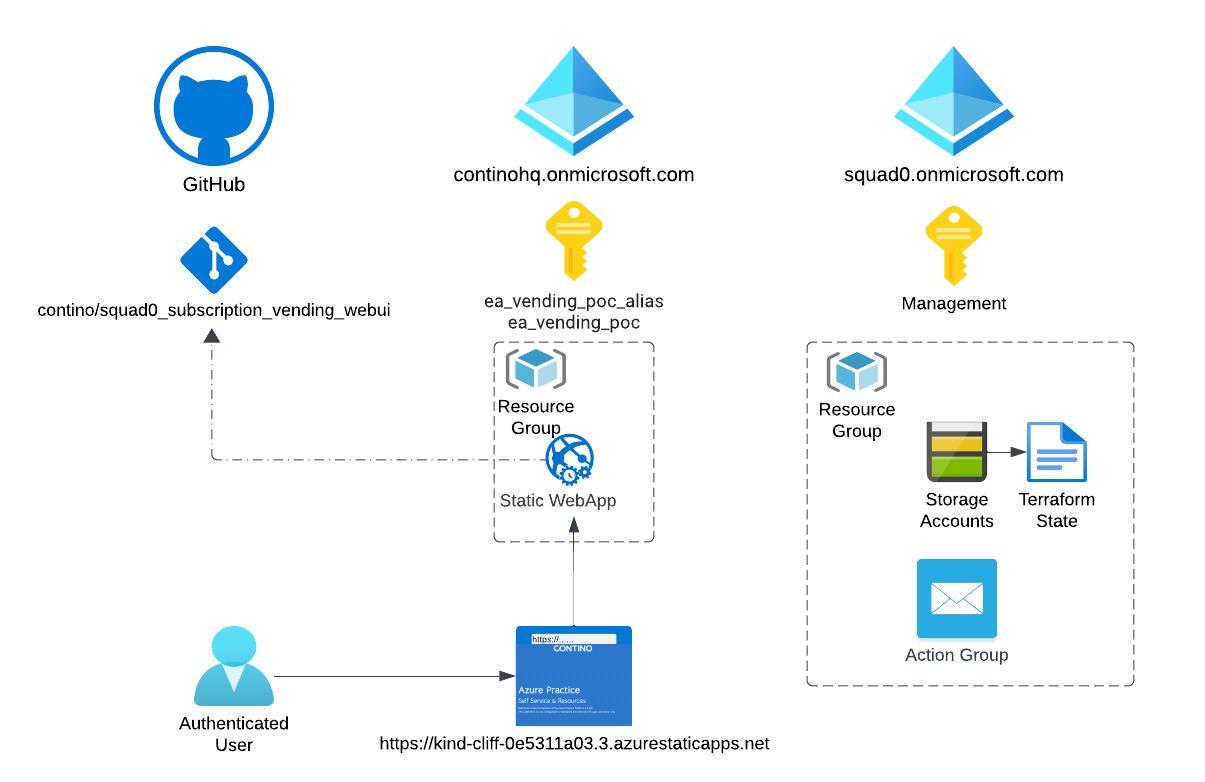
Contino utilises two Azure AD tenants to ensure the separation of Production and Development workloads. This separation aligns with Microsoft’s Best practices and facilitates the requirement for Continis to be able to create individual Azure AD service Principals and Managed Identity’s.
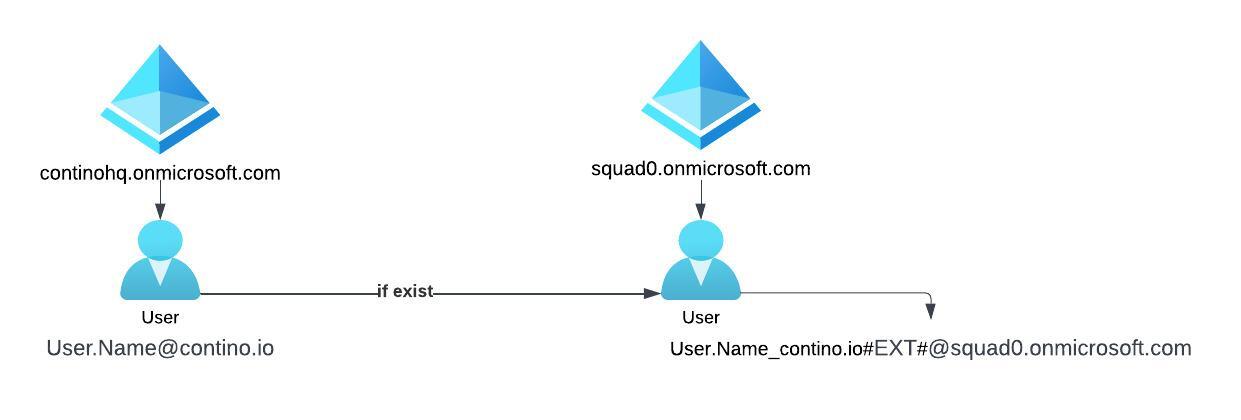
Upon each pipeline run a data lookup is performed to see if the user exits within the squad0 tenant, if they do not a new guest account is created within the tenant with the appropriate domain name suffix.
Management Subscriptions
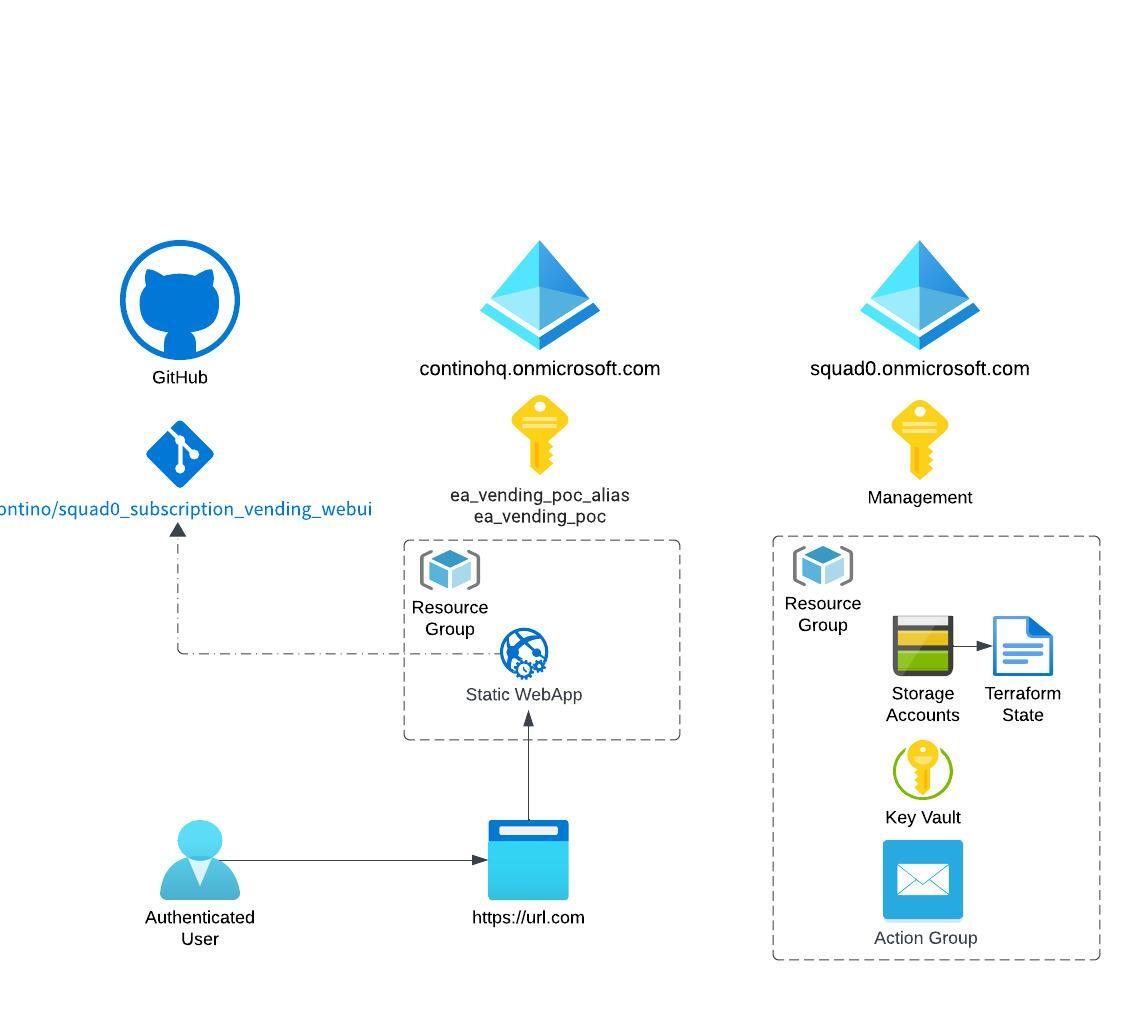
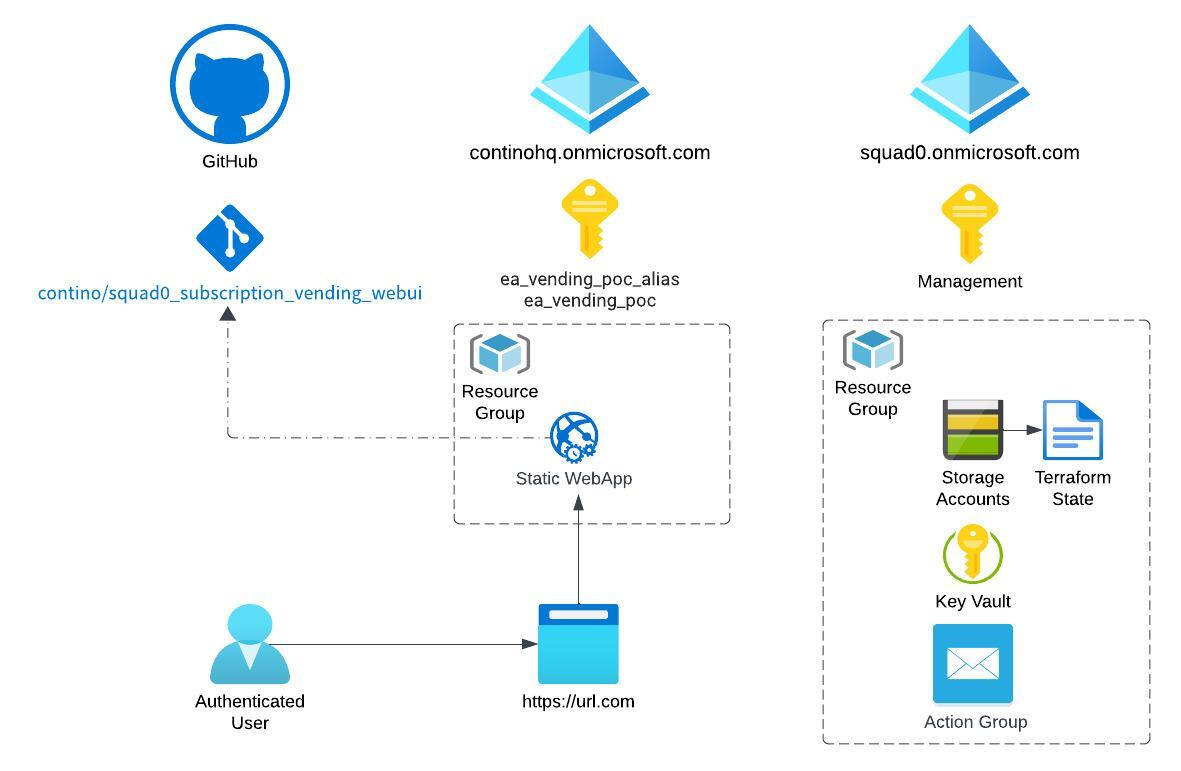
Within both continohq and squad0 tenants management subscriptions are deployed to host individual components of the solution.
Continohq- Hosts the Static WebApp UI, this WebApp links to the GitHub repository for configuration.
Squad0 - Hosts the Azure Storage Account hosting the Terraform state for each deployed subscription as well as a email Action Group used to notify administrators of budget alerts.
Developer Subscriptions
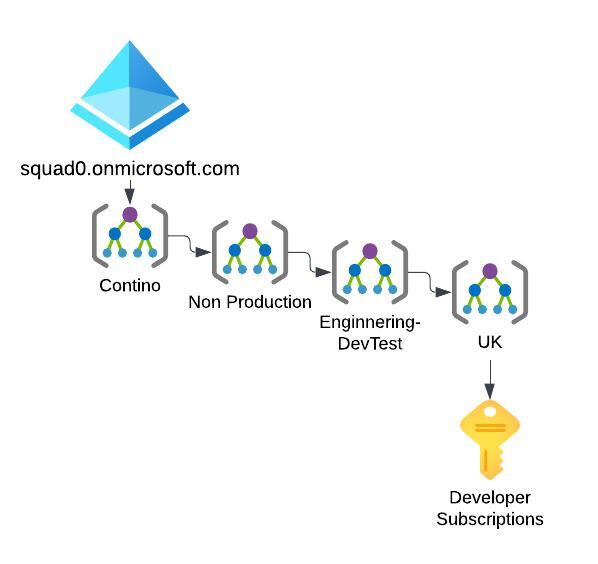
Each new subscription is automatically deployed under the squad0 tenant and Management Group structure, ensuring existing policy's and governance are automatically applied.
Optional Components
Each developer subscription is assigned a number of additional components, these include;
A subscription budget alert set at £60. Alerts are sent automatically to a action group when subscriptions exceed this limit
Subscription Level Service Principal. A new Service Principal is created and assigned owner permissions to the developers subscription.
GitHub repository within the contino-squad0 organisation. This is a separate GitHub organisation from the Contino
WebApp
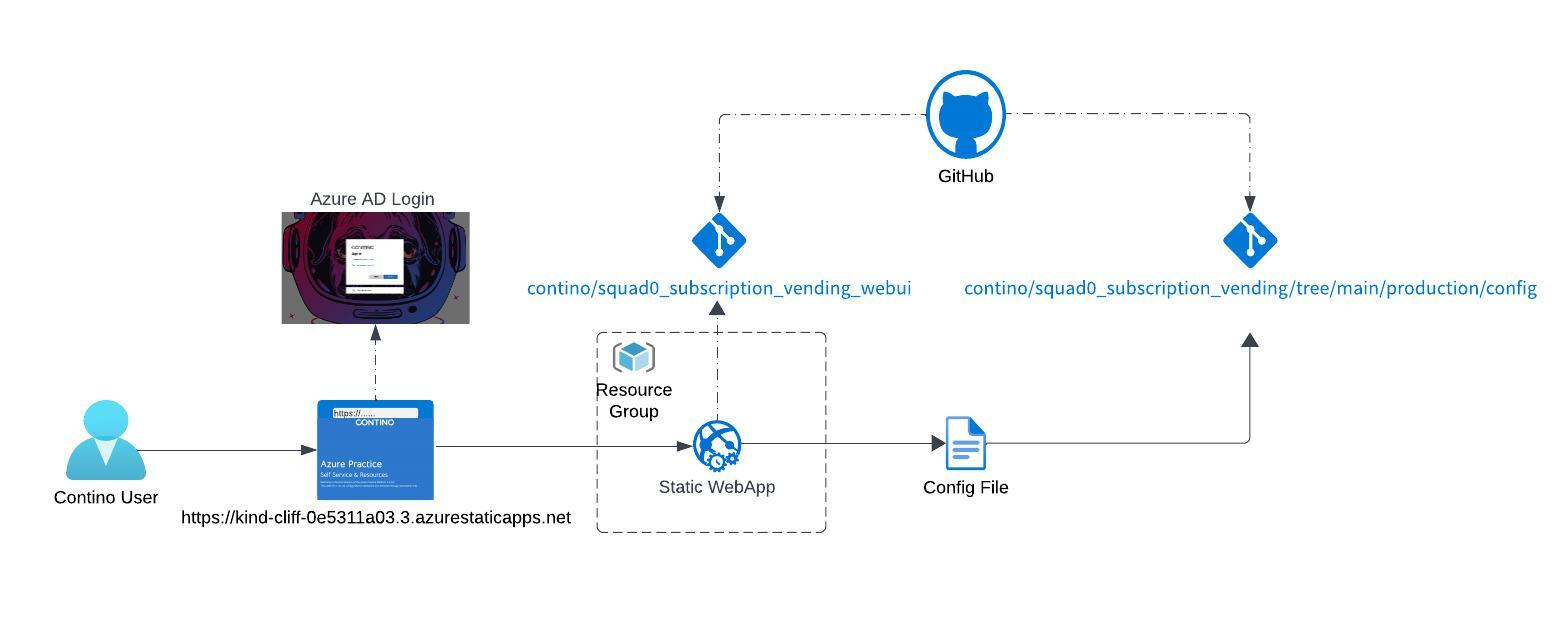
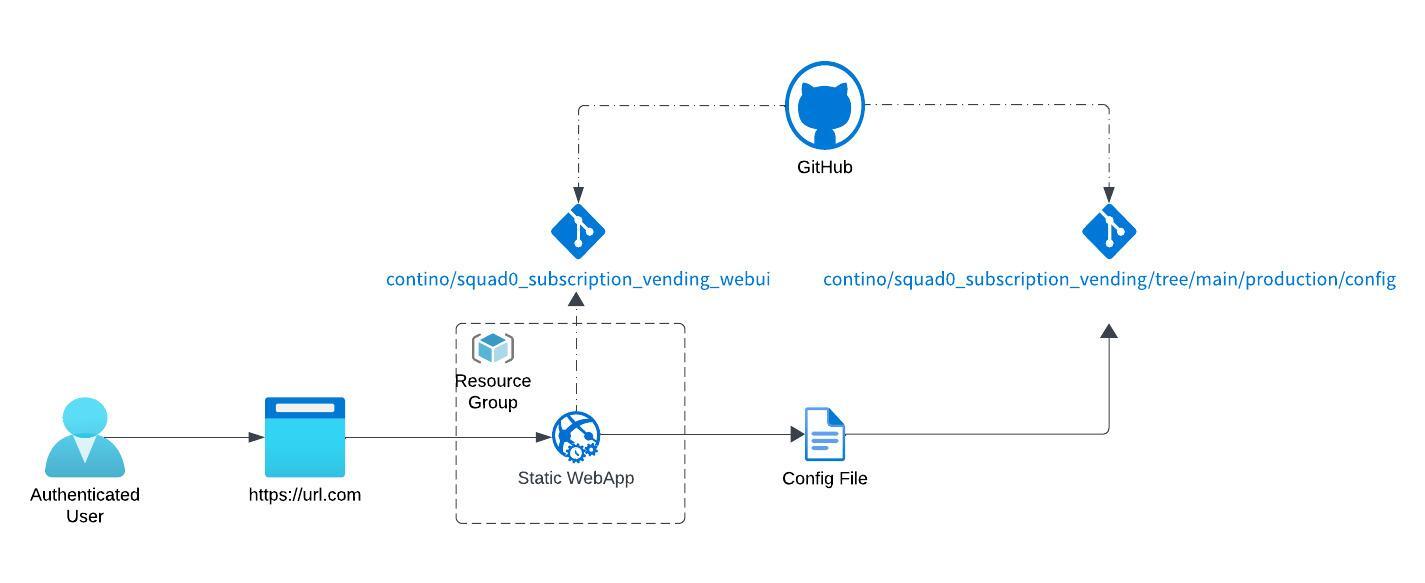
An Azure Static WebApp is deployed within the Continohq management subscription, providing users with a user-friendly web interface (UI) to request a new development subscription.
Contino users authenticate to the WebApp and fill in a web form contain all the required parameters for a new subscription, upon submit a GitHub pipeline is triggered, this pipeline triggers the creation of a new branch within the Contino/squad0_subscription_vending repository. Within the new Branch a config file is created within the production/config repository and a new pull request created ready for approval by approved admins to create the new subscription.
Manual Configuration File
Alongside the WebApp it is possible for developers to manually clone the Subscription Vending repository and create a new branch to upload “config.Json” as shown below. Following standard DevOps processes a running the XXX pipeline will create a pull request sent to the appropriate approvers.
  {
  "tenant"                 : "<contino|squad0>",                     #  selects the tenant to deply into
  "owner"                  : "<any string>",                         #  requesting users name
  "email"                  : "<valid email @contino.io>",            #  requesting users email - will be used as owner email
  "purpose"                : "ea_testing_s0",                        #  for housekeeping and management
  "alias"                  : "<must be unique subscription alias>",  #
  "subscription_name"      : "<must be unique repository name>",     #  if not entered, a programmatic name wll be created
  "workload"               : "<Production|DevTest>",                 #  for Contino must be Production for all others DevTest
  "apply_budget"           : true,                                   #  skip adding rhe 60GBP budget
  "github_repository"      : <""|"new"|"<existing>">,                #  if "new" creates new, or specify a repo to use existing
  "github_username"        : "pknw1",                                #  github username to add as a new repo owner
  "github_repo_org"        : "<contino|contino-squad0>",             #  specify the target org for the repo
  "template_repo_org"      : "<contino|contino-squad0|pknw1>",       #  specify the target org for the repo
  "template_repo"          : "terraform-boilerplate",                #
  "service_principal_name" : <""|"new"|"<existing>">                 # if "new" creates new, or specify existing sp (must be owner)
  }
Code Repository's
The following repositories are used as part of this solution.
Repository Name | Link | Notes |
|---|---|---|
Management | https://github.com/contino/azure_practice_management_iac_poc | Contains management resources |
Subscription Vending | Terraform modules to deploy subscriptions | |
Subscription Web | https://github.com/contino/squad0_subscription_vending_webui | Terraform modules for the WebApp |
Github Squad 0 | Separate organisation hosting subscription repository's |
Attachments:
 Screenshot 2023-04-21 at 13.52.33.png (image/png)
 image-20230421-130645.png (image/png)
 image-20230421-130517.png (image/png)
 image-20230421-124420.png (image/png)
 image-20230421-124324.png (image/png)
 image-20230421-124018.png (image/png)
 Screenshot 2023-04-21 at 13.37.45.png (image/png)
 Screenshot 2023-04-21 at 12.31.21sss.png (image/png)
 Screenshot 2023-04-21 at 12.31.21.png (image/png)
 Blank diagram.jpeg (image/jpeg)
 Subscription Vending - Copy of Page 1.jpeg (image/jpeg)
 Subscription Vending - Page 3.jpeg (image/jpeg)
Subscription Vending - Page 1.jpeg (image/jpeg)
Subscription Vending - Page 3.jpeg (image/jpeg)
Subscription Vending - Page 1.jpeg (image/jpeg)
 Subscription Vending - Page 1 (1).jpeg (image/jpeg)
 Subscription Vending - WebApp.jpeg (image/jpeg)
 Subscription Vending - Logical.jpeg (image/jpeg)
 Subscription Vending - Logical (1).jpeg (image/jpeg)
 Subscription Vending - WebApp (1).jpeg (image/jpeg)
Subscription Vending - Logical (2).jpeg (image/jpeg)
Subscription Vending - WebApp (1).jpeg (image/jpeg)
Subscription Vending - Logical (2).jpeg (image/jpeg)