Paul K space : Resource Tagging - (incomplete - on hold)

:gh:

:azure:

Azure Tags will allow us to better manage our resources and ensure that minimal effort is expended managing cost and resource

Below are details on a RFC from Azure Practice in regards to how to best accomplish this

Business Level - Understand and Manage

Environment Level - Support and Maintain

Engineering Level - Automate, Facilitate IaC/Automation, Simplify BAU

Subscriptions

A design and plan for tagging in the business should be defined, communicated, iterated and delivered for implementation such that additional uses for tags outside practice cost and resource management, are considered and potentially integrated into operational procedure

  • simplify support

  • simplify location of resources for leavers/support

  • project resources

  • cost allocations and considerations

  • business impact

General

  • What

  • Who

  • Why

  • Repeat

  • We should ensure subscriptions are tagged for what their intended delivery environment and thus impact to the business - and potential risk factors
    • All subscriptions should be tagged with “Environment” tag to indicate Production, Platform - any other tag would imply default to DEV

    • we should always be able to identify who is the “go to” consultant for a subscription, so it is suggested that subscriptions be updated with, and in future tagged with a non-optional (by Policy) tag “Owner

      • we should be able to identify the purpose of the subscription. whilst this might change, generally we know why we request one - so it is suggested that subscriptions be tagged with a “Requirement”, “Reason” or “purpose” tag
        • Tag can be added or updated ad-hoc
        • Tag can be pulled from assigned management group

        • (Production/Platform) Particularly on internal systems, we may see ownership or other factors change - we should tag a periodic review date for all non-dev systems that list required validation of the information etc, suggested below
          • compliance - check status - is it in use, scaled correctly, fit for purpose
          • compliance - check owner - who gets the bill? who knows who maintains it
          • compliance - check patching - periodic checking of patching
          • compliance - check versions - periodic checking of versions and updates

    (Production and Platform)

    • Current and In-Use

    • Owner still valid

    • Engineers still valid

    • Security re-validation

    • Patching re-validation

    • Versions re-validation

    Also inherits the requirements that would be required across all subscriptions


    • We should tag a periodic review date for all non-dev systems for critical factors that could pose risk or impact the business negatively
      • standalone service in use : dd/mm/yy
      • integrated with Google Workspaces : dd/mm/yy

      • Check the owner is with the company, is happy to stay as the owner and is familiar with any aspect to ensure smooth operation, maintenance and disaster recovery

        • Check the engineer(s) are still valid
          • Check the tech is still good and docs are up to date

          • scanning/pen-test dates requirements

            • ensure automated patching etc is working

      (Non-production)

      • Current and User Valid

      • Cost Conscious

      • Encourage IaC

      • Encourage On-Demand

      • Be Automated

      • Facilitate Easier Automation and Integrations

      Also inherits the requirements that would be required across all subscriptions


      With a Dev Subscription, we should look to encourage good management and not restrict innovation - and encourage IaC

      • we should enforce tag inheritance from resource groups

        • This ensures that any tag we apply to a RG will also show

        • resource groups are the management tool within subscriptions to separate resources, so they are the logical SST (single source of thruth)


        • each resource group should have an expiry date at which the user has indicated by inaction that the resources could be purged

          • resource group expiry tag should auto-set but be updatable by contributors to reflect how they need it managed

            • expires: dd/mm/yy

            • expires: never

            • expires: tag missing


          • resource groups deployed by IaC could be tagged with the deployment and un-deployment process (details to be failed fast soon) so that should an expiry date appear, we un-deploy


            • resource groups deployed by IaC could be tagged (auto?) with schedules for deploy/un-deploy


              • resource groups could be auto-tagged with project details


                • resource groups could be auto-tagged with doc links


                  • resource groups within a subscription could be tagged with alternative engineer details for delegated engineering contact


                    • resource groups could be tagged with contact details for monitoring alerts/cost alerts etc and be picked up by simple automation into Azure Alert Groups defined loosely in the group - auto-populating from tags


        Automation Solutions

        By using tagging, we open a simpler path to integration and automation by allowing us to define fields and data types as enablers for scanning, processing and logic based actions

        At a high level, a new standard business process can be defined to facilitate pluggable automation

        scenario;

        a GitHub repository can be developed that utilises GitHub Actions

        1. using workflow scheduling, process a workflow that has multiple jobs, each stage designed and added to once the core scheduler works as expected

        2. A general function producing a list of subscriptions to check can be developed - such that checks are performed either daily, weekly, monthly only on the defined set

        3. a re-usable framework defined as

        • for check-daily

          • if production

            • get "check-status" tag

            • if today

              • do checks

          • if development

            • check resource group tags

              • get "expires" tags

              • if today

                • delete groups

            • check deploy/un-deploy tags

              • if un-deploy = within defined range

                • get un-deply-link-tag

                • undeploy

        Due to the flexible nature of GitHub Actions, we can define checks and actions externally

        • docker container action

        • CLI script

        • Powershell

        • etc

        developed externally and added into the appropriate section as needed

        Category

        Automation

        Benefit

        •  

        Compliance

        environment: tag

        requirement: tag

        Non-dev systems are known and automation of compliance tasks can be developed

        • automated scanning and reporting

        • correct classification of compliance requirement

        • automated pen-testing for external systems

        • automated escalation of issues

        •  

        Cost

        expires: tag

        • Correct budget allocation

        • visibility of client work

        Process

        Owners: tag contains zz_

        project_contact: tag

        • automated pick up of leavers resources

        • automated notification to concerned stakeholders

        •  

        Delivery

        A plan for delivering into the business with maximum visibility, maximum support, minimal risk should be agreed

        Non-Dev

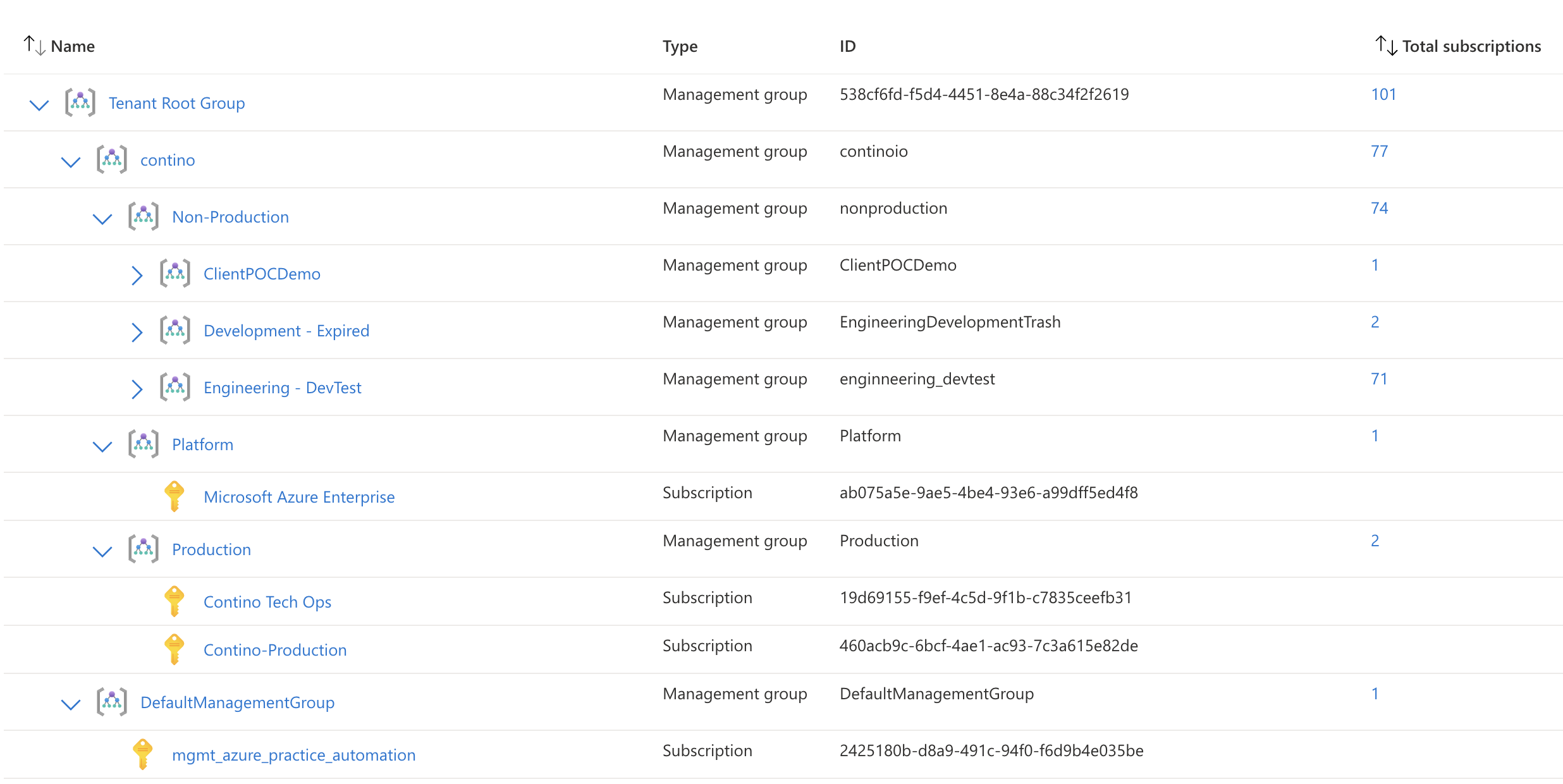
          1. Development Design with custom management groups mirroring BAU

          2. Production Classified Systems

            1. apply automation to apply Mgmt Group name as “Environment” tag

              1. ensure policy application in desired manner to group

              2. pass validation

              3. apply automation in production

              4. apply policy in production using “notifcation”

              5. adjust policy for enforcement

            2. Apply “Owner” tagging and validate automation to validate on DD/MM/YY

            3. Apply other validation tags and test

          3. Platform Classified Systems

            1. repeat as above


          Dev Systems

            1. Automate push of “Empty” tags to all subscriptions

              1. Owner

              2. Environment

              3. Reason

            2. Communicate to practice and all owners

              1. Details on Tagging (subscriptions then resource groups)

              2. Details on Policy

              3. Explainer/Reasoning

              4. Timescales

              5. request for feedback

            3. Challenge Subscription Owners to Populate the auto-pushed tags

              1. Review/repeat

            4. Trial Groups to test various configurations