Implement a proof of concept demonstration for use internally or with a client to show how they can leverage AI to respond to customer queries using the customer website as the source of data for training AI
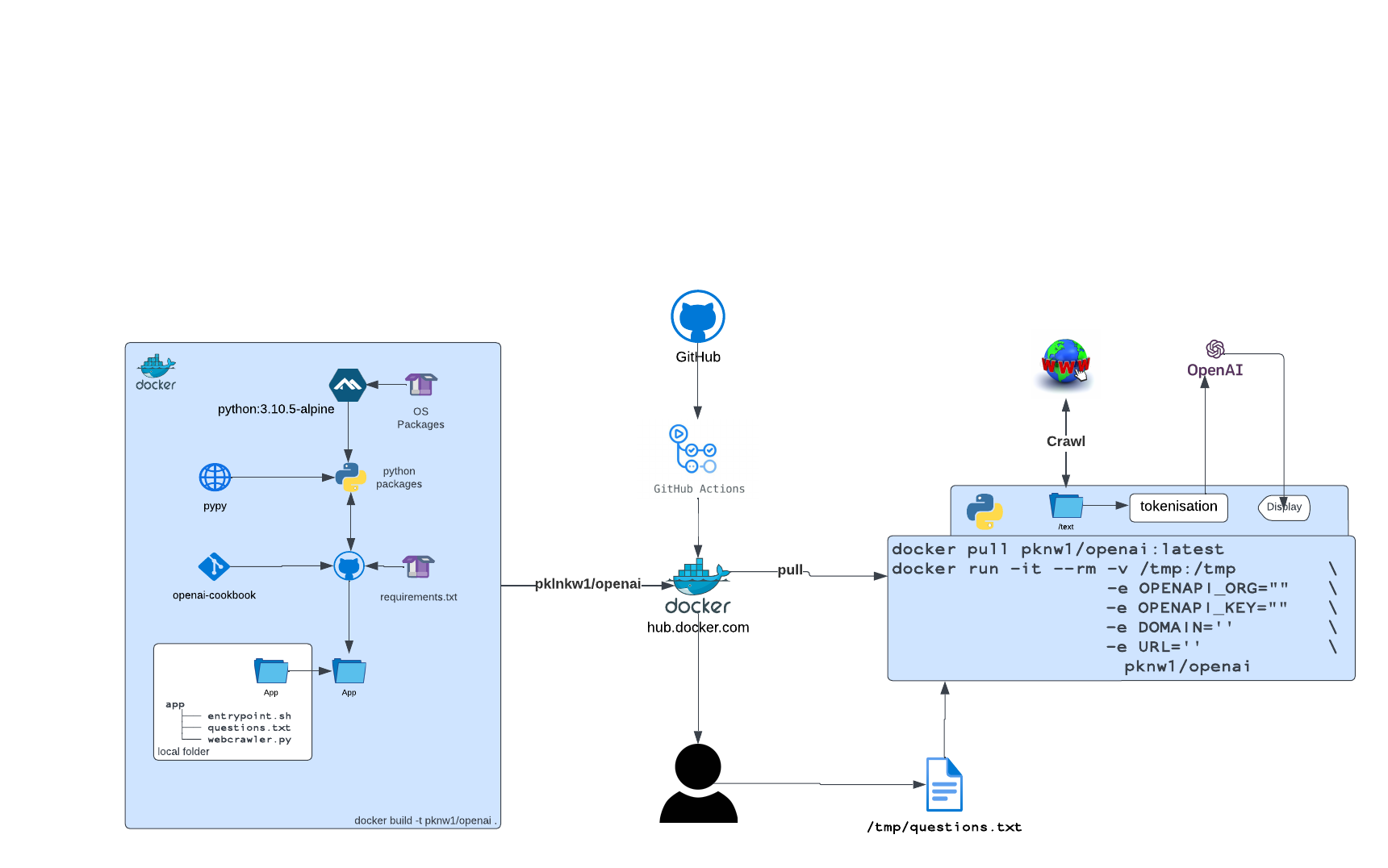
Using the reference material in the openai-cookbook, two python applications have been created - with both functions being delivered in docker container - the application from it’s original form has lead to the following decisions
There may be multiple hard coded values and temporary keys in files while delivery a rapid delivery POC such as this - once final design is approved and all function as expected, standard secret stored values and non-development keys will be used
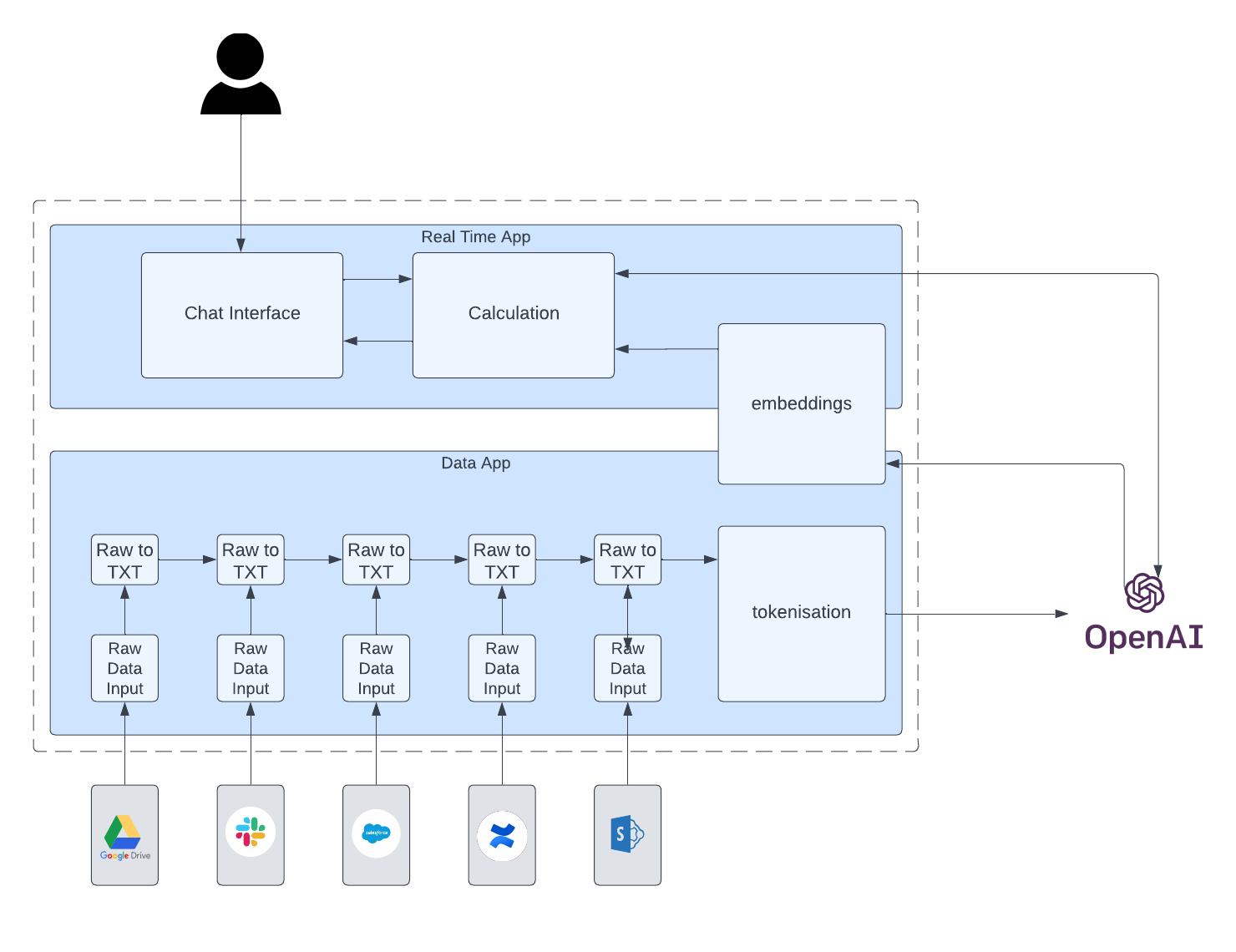
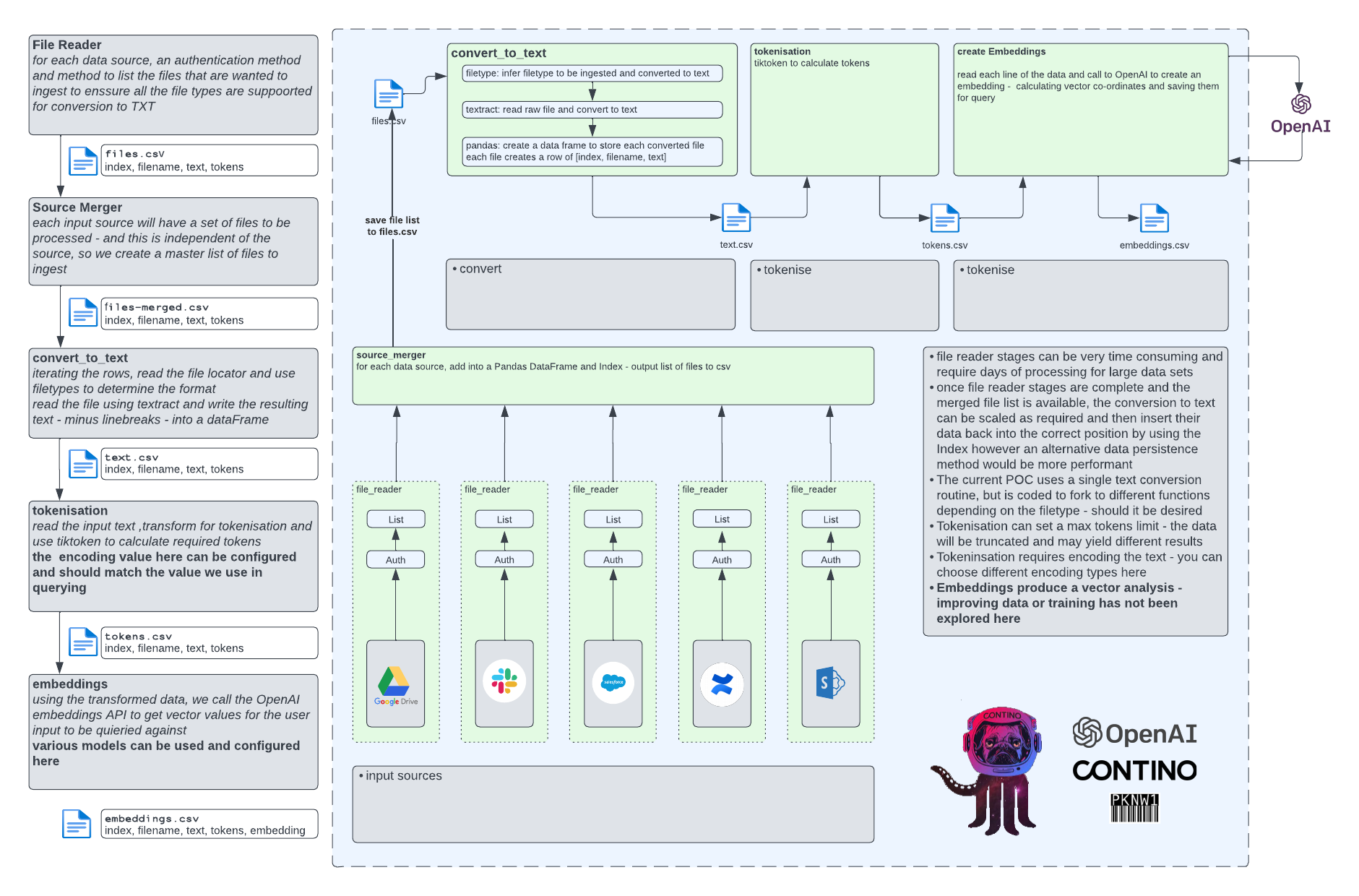
Systems Overview / High Level Summary
Take a question from a user and using pre-parsed data from crawling the source URL, respond with an answer using specific coding settings and model setting
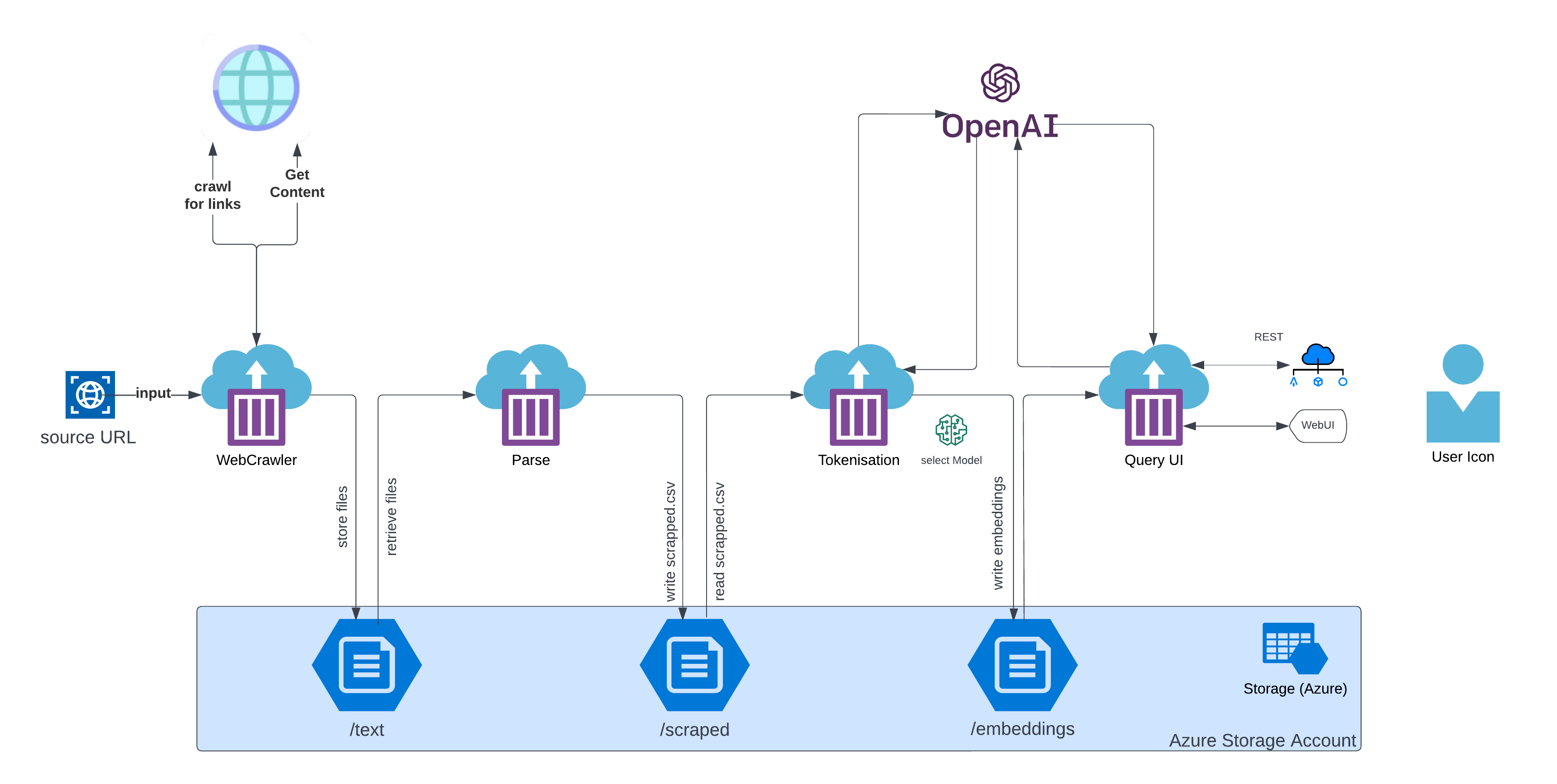
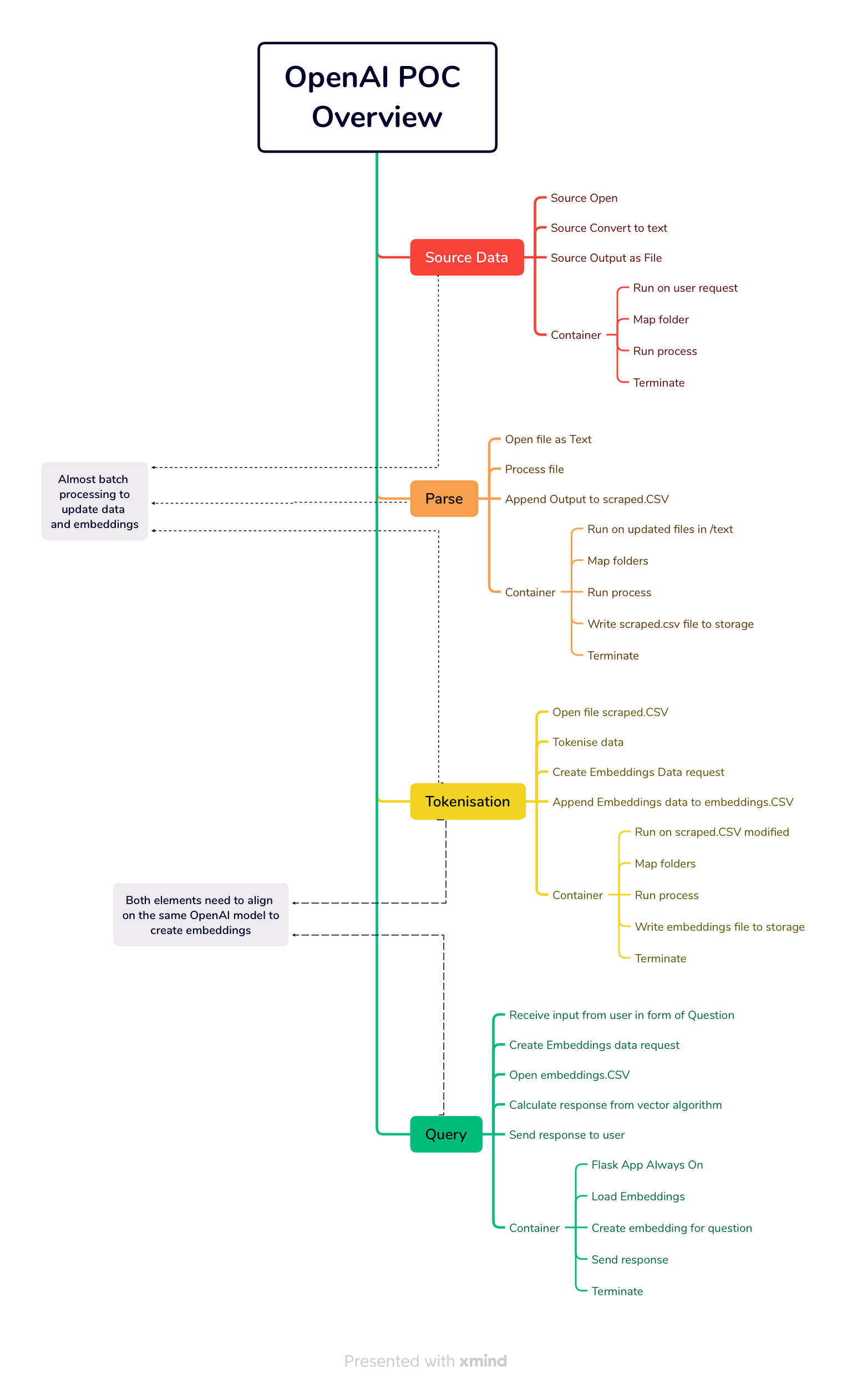
There are 4 stages to the operation of the POC - broken down into major function
The WebCrawler
the WebCrawler container launches accepting the target URL as an input. The WebCrawler starts at the target URL and creates a map of links to download in memory
Once the list has been fully updated, the WebCrawler loads the page, grabs the content - converting from HTML to text, and outputs the content in a file under the folder
/text/<target url>the
/textfolder is a remote file mount to a storage account - allowing data sharing between the other processes

The Data Processor
The data processor container reads the raw text from the files under /text and performs a number of cleansing and normalising tasks before formatting the data and storing in in /scraped/scraped.csv
currently has no trigger defined
accepts the URL as input, using that to find and retrieve files
The Tokeniser
The tokeniser is the major interface for our data to openAI so that it can be used meaningfully
format and split the data into “tokens” - which will often be 125% of the word count from the source data.
calculate token totals and format the data into a row of
/embeddings/embeddings.csvuses
openai.Embedding.createto obtain vector calculations to associate with the data and store into/embeddings/embeddings.csvencodingcan be set here - must match the UI settingenginecan be set here - must match the UI setting
Query/User Interface
The UI container has a CLI and WebUI mode and in either mode performs the same discreet functions
Provide the user interface for the user to pose a query
Prompt for user input
send the user data via
openai.Embedding.createtoopenai.comand receive a responseDisplay the response to the user
This implementation uses the Embeddings OpenAI function - but can be adapted to use Other functions across a wide range of the available Models
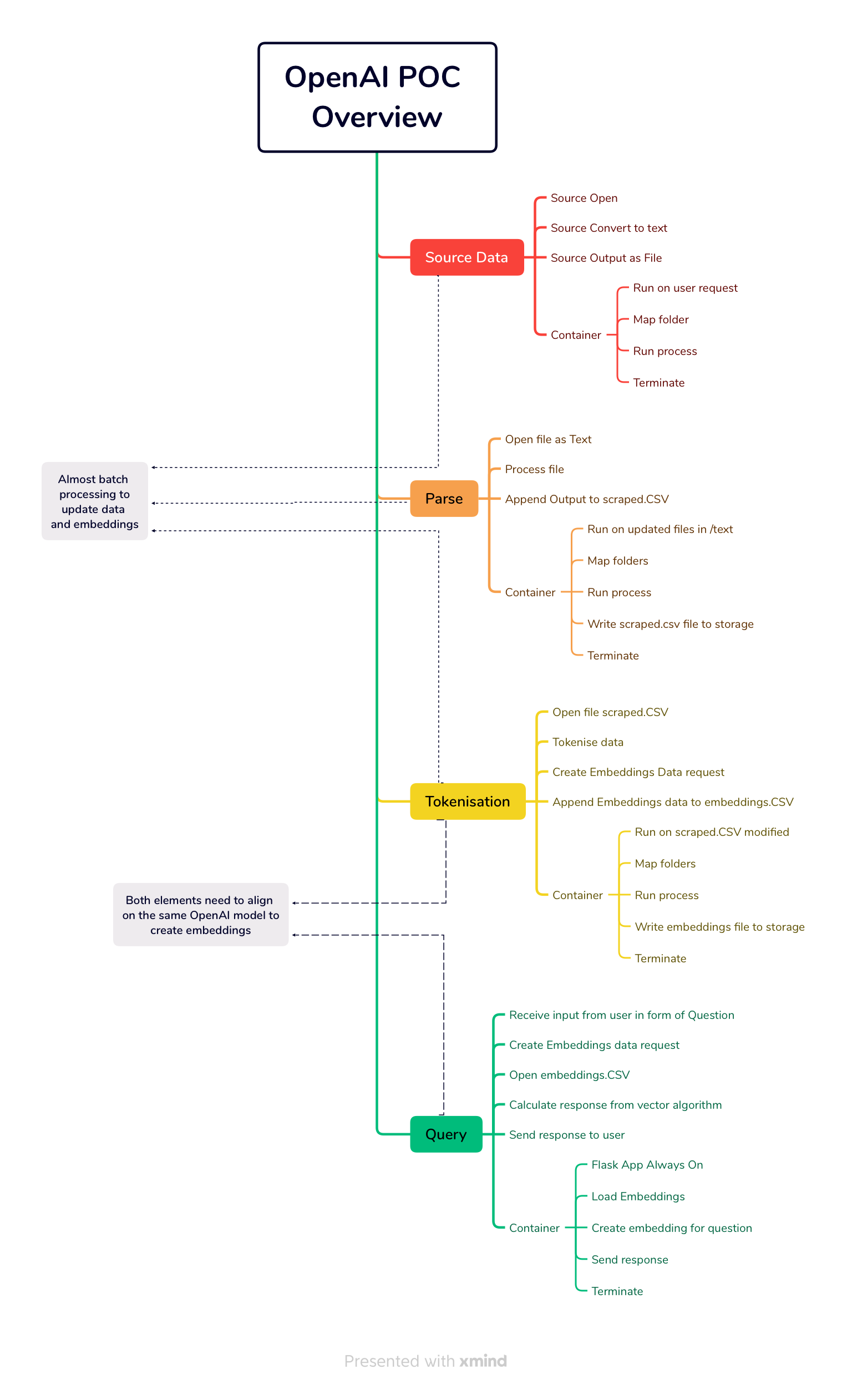
The WebCrawler , Processor and Tokeniser are non-interactive processes and the data crawl alone can be VERY time intensive.
Due to the POC nature of the implementation, the processes - while interdependent, have been split apart to minimise risk of data loss in the event of an uncaught exception (which can reset the entire process!)
All modules can be used to facilitate multiple data sets as the data will be segregated by domain - further iterations may consider
webcrawler process over multiple sources and updating rather than from scratch every time
automatic triggering of the
processcontainer when new raw data is availableautomatic triggering of the
tokenisationprocess when new scraped data is availablethe facility in the UK to select which data source to query (easy quick win)
Revisions
revision 1.0.0 of the high level design
The initial build was a mono-code beast which lost all the data when an error occurred and deployed from a single container
the uncaught exceptions lead to splitting apps apart
the 5.7Gb single image was slow so evolved to a common single build base image which each component only installs its unique requirements on
containers using local mounts
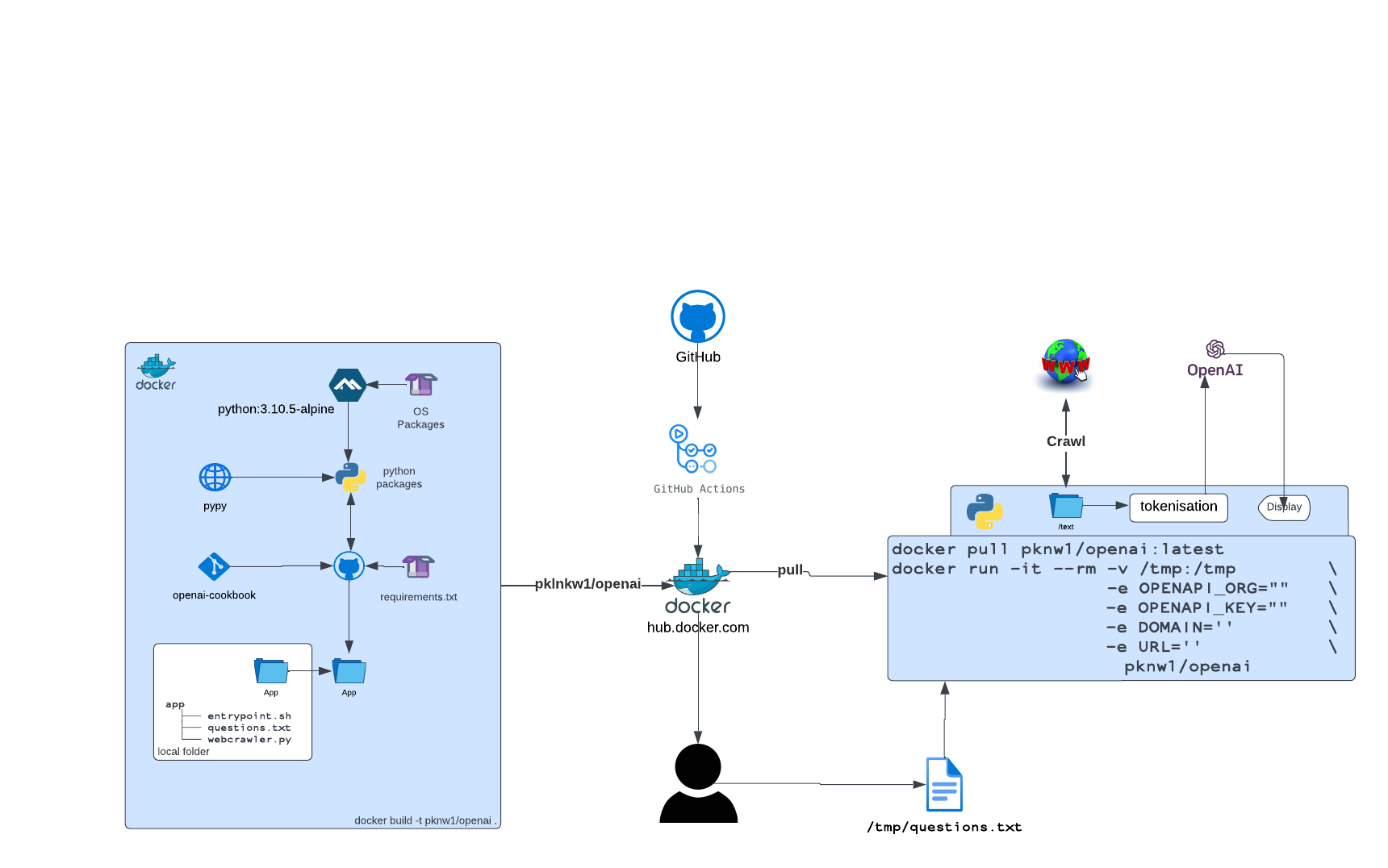
revision 1.0.1 of the high level design
Splitting into 4 functions, we can run each instance when required and the previous step is complete
share data via a storage account mount for each
/text/scraped/embeddings
This revisions allows more flexibility in swapping out components and being able to add extra steps or processing without breaking the original workflow
ToDo
refinement and due diligence on User stories
rapid test of Completion
Completion/Embedding process differences and switching
Switching models and code changes
Additional Source Data ingestion - from files or other - to accept PDF etc and deliver the data into
/filesfolder as for Web CrawlerCan we merge Embeddings after processing - update and improve rather than re-start
setup guide for repository workflows and terraform/azure integration using Github actions and Secrets
automation and triggering of the 3 data collection and parsing processes
adaption of web-crawler to allow multiple sites to crawl
adaption of web-ui to allow selection of pre-embedded data source to query
other integrations
Attachments:
 Screenshot 2023-05-15 at 08.02.33.png (image/png)
 OpenAI POC - Page 3.png (image/png)
OpenAI_POC.png (image/png)
OpenAI POC - Page 3.png (image/png)
OpenAI_POC.png (image/png)
 OpenAI_POC.png (image/png)
version=1&uuid=AEDD574E-C17B-41D6-957F-DD79A3210461&mode=compatible.png (image/png)
OpenAI_POC.png (image/png)
version=1&uuid=AEDD574E-C17B-41D6-957F-DD79A3210461&mode=compatible.png (image/png)
 contino_opoenai_banner.png (image/png)
 version=1&uuid=AEDD574E-C17B-41D6-957F-DD79A3210461&mode=compatible.png (image/png)
image-20230521-211602.png (image/png)
image-20230521-211611.png (image/png)
version=1&uuid=AEDD574E-C17B-41D6-957F-DD79A3210461&mode=compatible.png (image/png)
image-20230521-211602.png (image/png)
image-20230521-211611.png (image/png)